
How to view your plan, usage and billing history
Who can do this: Admins
The Billing page shows your organisation’s Blend-ed plan, how much of it you’re using, and your invoices.
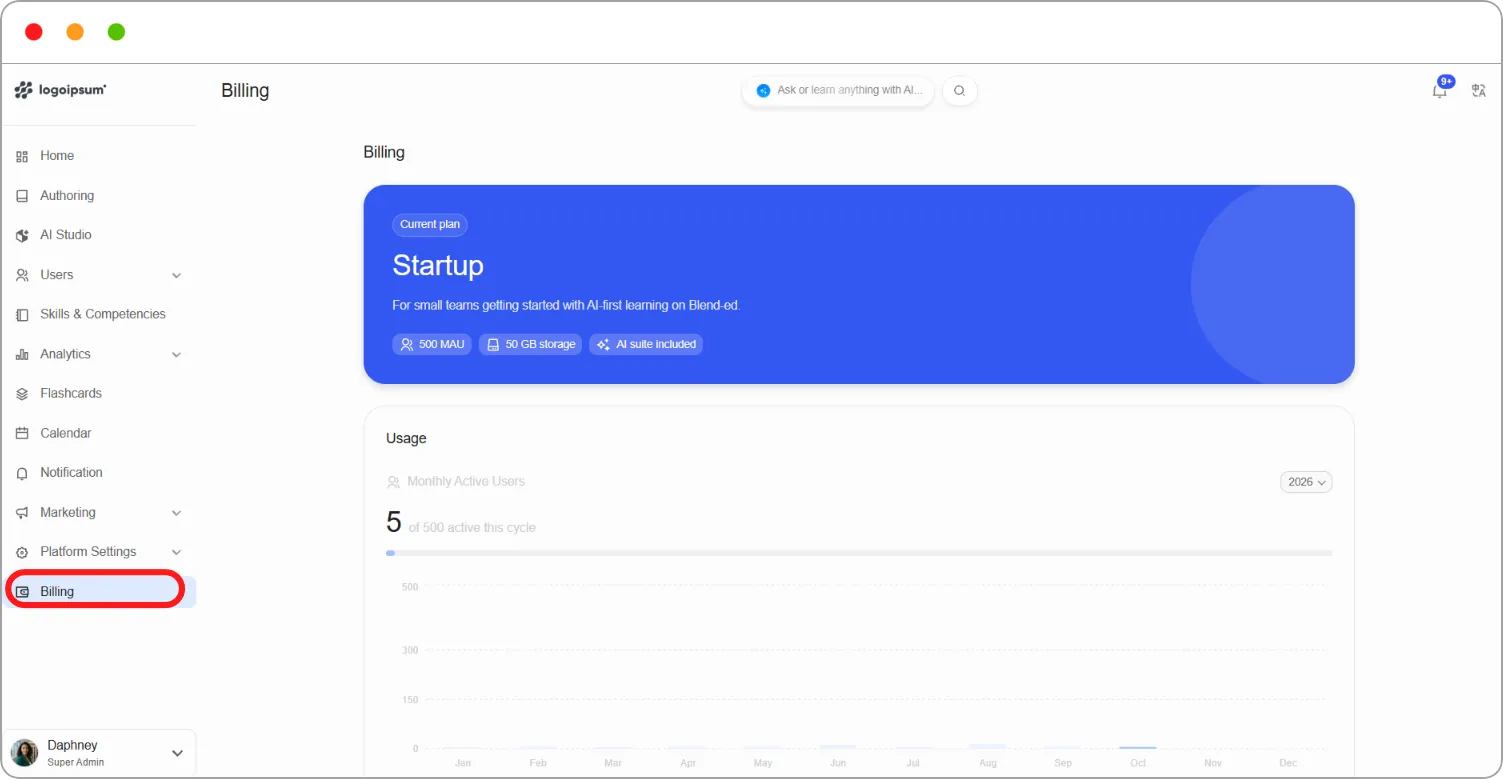
Step 1: Go to Billing in the left navigation.
Current plan
Section titled “Current plan”The top card shows your Current plan, for example Startup, with a short description and what it includes:
| Item | What it means |
|---|---|
| MAU | The number of monthly active users your plan allows, for example 500 MAU |
| Storage | Your storage allowance, for example 50 GB storage |
| AI suite included | Whether the AI tools are included in your plan |
| Item | What it shows |
|---|---|
| Monthly Active Users | How many users have been active this billing cycle against your limit, for example 5 of 500 active this cycle, with a month-by-month chart |
| AI Credits | How many AI credits you’ve used against your allowance, for example 1265 of 15000 credits used |
Use the year menu, for example 2026, to see usage for a different year.
Tip: Check your Monthly Active Users before inviting a large group of learners. If you’re close to your limit, plan ahead before you run out.
Billing history
Section titled “Billing history”Billing history lists your invoices with the Invoice ID, Bill Date, Invoice Date and Amount.
-
Type in Search by invoice ID or amount to find an invoice.
-
Use the year menu, for example All years, to narrow the list.