
How to change a learner's enrolment mode
Who can do this: Super Admin, Admin, or Staff with the Enrollment Management permission
Move a learner between enrolment modes without unenrolling them. Use it when someone upgrades, when an enrolment was made on the wrong mode, or when you’re moving a cohort onto a different plan.
Step 1: Open the course, then click Enrollments.
Step 2: Click Manage Enrollments.
The table switches into editing mode. Each learner’s Mode becomes a dropdown.
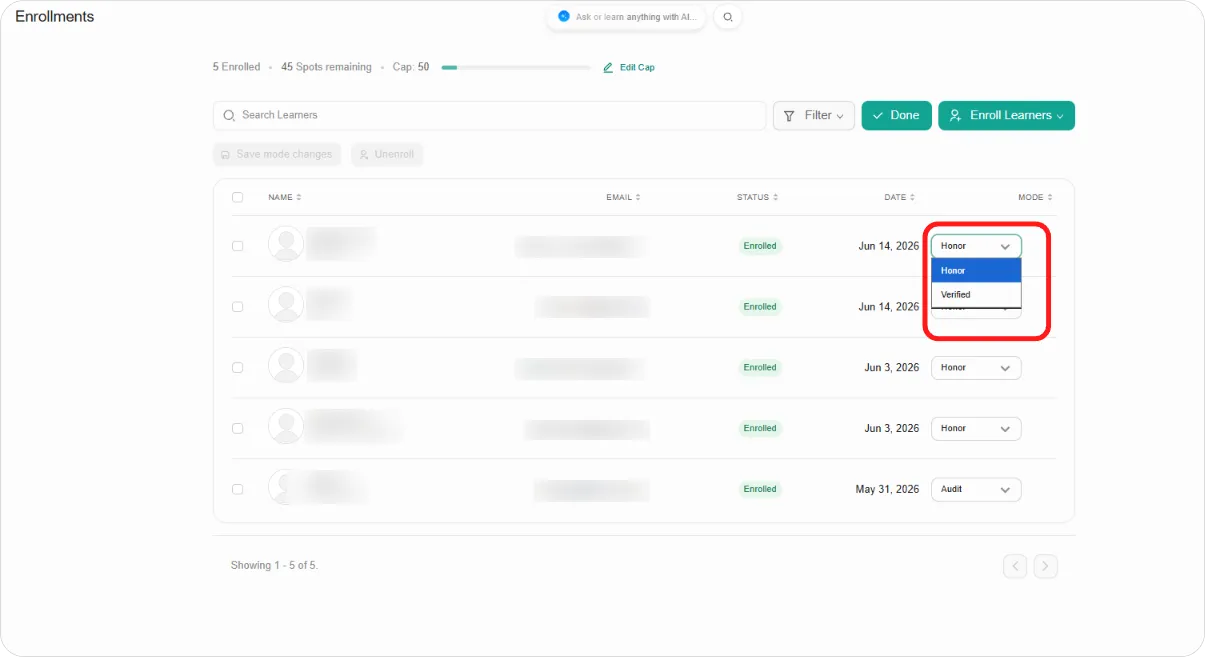
Step 3: Change the mode on each learner you want to move.
Step 4: Click Save mode changes.
Step 5: Click Done to leave editing mode.
Note: Changing someone to a paid mode doesn’t charge them. It grants the access that mode carries. Use it when payment happened elsewhere, or when you’re granting access as part of a deal.
Tip: Changing the mode keeps the learner’s progress intact. There’s no need to unenrol and re-enrol them.