
Learning Experience & Engagement
Who this is for: Learners
This section covers everything you do as a learner on Blend-ed: working through courses, using the tools inside each lesson, and tracking what you’ve achieved.
Your dashboard
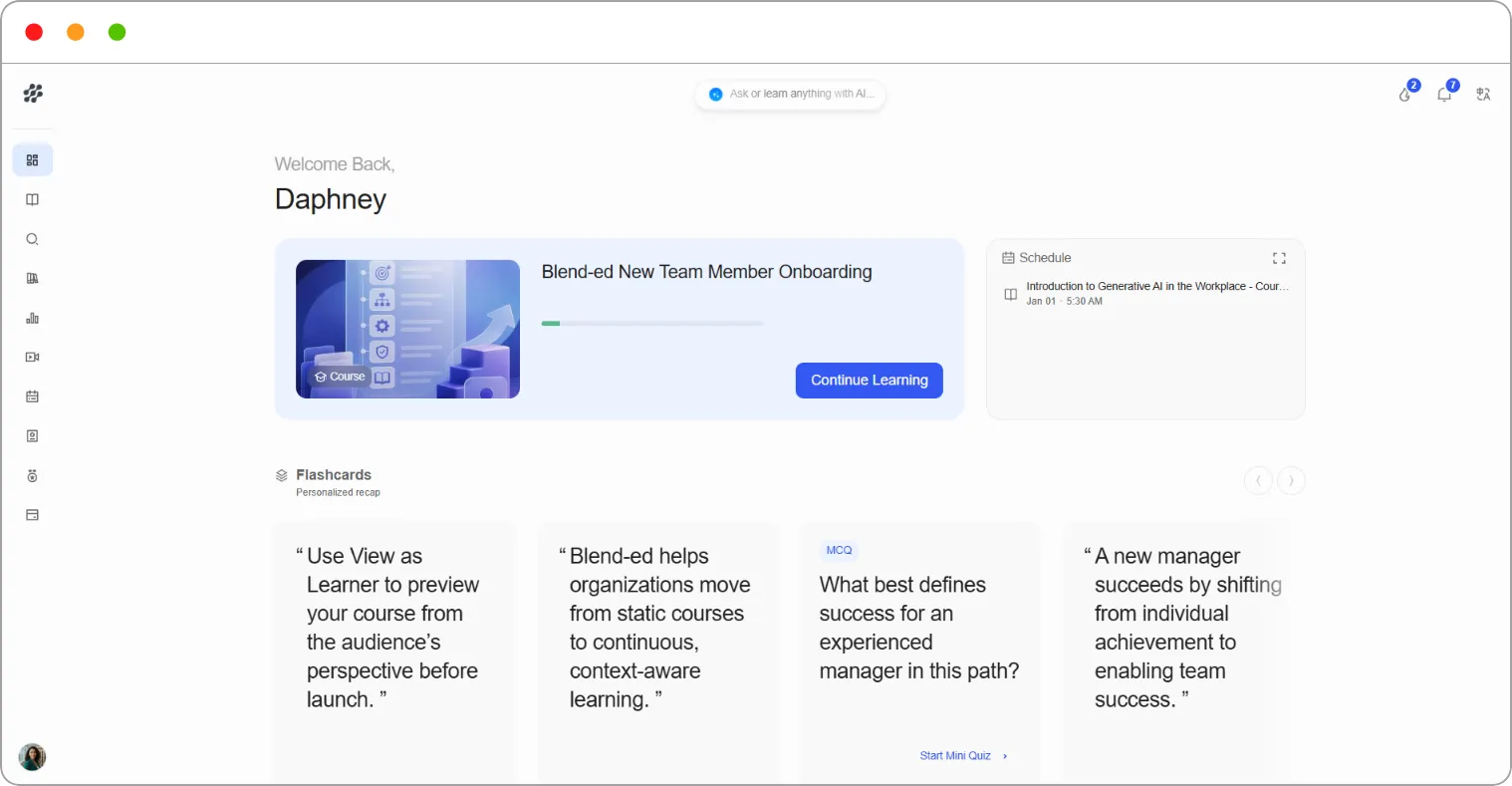
Section titled “Your dashboard”When you sign in, you land on your Dashboard. It greets you by name and shows:
| Area | What it shows |
|---|---|
| Continue Learning card | The course you were last working on, with a Continue Learning button |
| Schedule | Your upcoming events and live sessions |
| Flashcards | A personalised recap of what you’ve studied |
| On-going Courses | Every course you’ve started |
| Explore Courses | A shortcut to the course catalogue |
Where everything lives
Section titled “Where everything lives”In the left navigation:
| Page | What it holds |
|---|---|
| Dashboard | Your home page |
| Learning | Your courses (My Learning tab) and all your notes (Notes tab) |
| Discover | The course catalogue |
| Library | Files from your courses, to view or download |
| Progress | Your overall progress, points and leaderboard |
| Live Sessions | Live classes you can join |
| My Schedule | Your upcoming events |
| Skill Passport | Your skills and competencies |
| Certifications | Certificates you’ve earned |
| Subscriptions | Your plan and payments |
At the top of every page:
| Item | What it does |
|---|---|
| Ask or learn anything with AI | Opens the AI search assistant |
| Flame icon | Shows your current streak in days |
| Bell icon | Shows your notifications |
| Language icon | Changes the language of the platform |
Note: Your organisation decides which features are switched on. If something in this section isn’t in your navigation, it hasn’t been enabled for your platform.
Note: Finding and enrolling in courses is covered in Enrollment & Publishing. Your profile, account security, subscription and purchase history are covered in Account & Billing.
What’s in this section
-
Taking a course — finding your way around a course and working through lessons
-
Lesson tools — discussions, notes, AI Tutor, calculator and language
-
Study and support — Flashcards and the AI search assistant
-
Progress and rewards — progress, streaks, points, leaderboard and certificates
-
Skills — your Skill Passport
-
Resources and live learning — Library, live sessions and schedule
Note: Badges are coming soon.
Articles in this section
Section titled “Articles in this section”- How to find your way around a course
- How to work through a lesson
- How to take part in course discussions
- How to highlight text and take notes
- How to use the AI Tutor in a lesson
- How to use the calculator
- How to read a lesson in another language
- How to use Flashcards
- How to use the AI search assistant
- How to track your progress
- How streaks, points and the leaderboard work
- How to view, download and share your certificates
- How to manage your Skill Passport
- How to use your Library
- How to join a live session
- How to view your schedule