
How to use the AI search assistant
Who can do this: Learners
The AI search assistant answers questions about your learning from anywhere on the platform. Ask it to find a course, recommend what to take next, or explain what a course covers.
Note: The AI search assistant is marked EXPERIMENTAL. Its answers and features may change.
Steps
Step 1: Click Ask or learn anything with AI… at the top of any page.
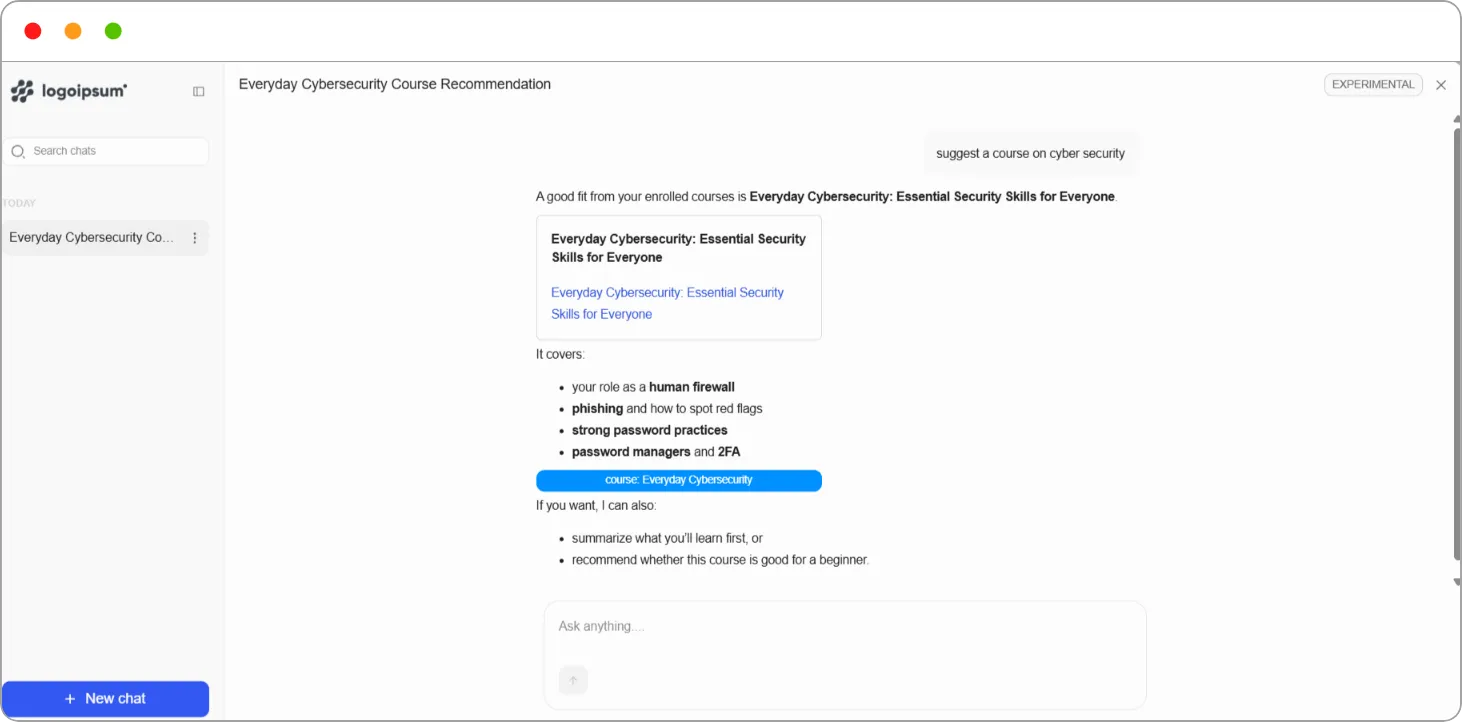
The assistant opens with What can I help you with? and a few suggested questions.
Step 2: Click a suggestion, or type your own question in Ask anything…, for example suggest a course on cyber security.
Step 3: Click the send arrow.
The assistant replies in the chat. When it recommends a course, the course appears as a card with a link you can click to open it.
Managing your chats
Section titled “Managing your chats”| Item | What it does |
|---|---|
| + New chat | Starts a fresh conversation |
| Search chats | Finds an earlier conversation |
| Chat list | Shows your past chats, grouped by date. Click one to reopen it |
| Panel icon | Hides or shows the chat list |
| × | Closes the assistant |
Tip: Use the AI search assistant for questions about your courses as a whole, such as what to take next. Use the AI Tutor inside a lesson for questions about that specific lesson.
Note: AI can make mistakes. Check important information before acting on it.
Related articles