
How to find and filter users
Who can do this: Super Admin, Admin, or Staff with the User Management permission
Once your platform has more than a page of users, search and filtering are how you find anyone.
Step 1: Go to Users > All.
Step 2: Use any of the following:
| Control | What it does |
|---|---|
| Search User | Finds a user by name or username |
| Role: All | Shows only Admins, Staff, or Learners |
| Sort | Changes the order of the list |
| Page controls | Move through the list at the bottom |
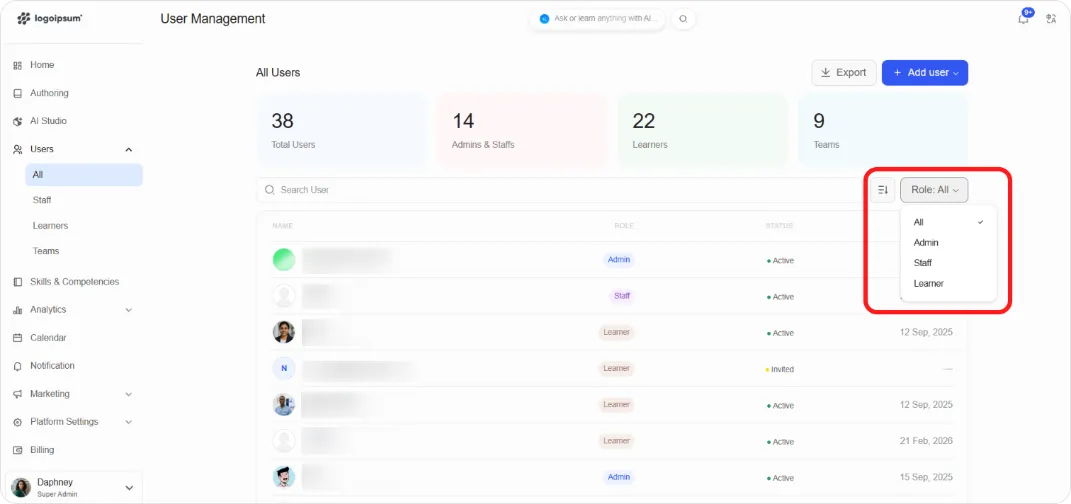
Step 3: Click any row to open that user’s details.
Reading the table
Section titled “Reading the table”| Column | Shows |
|---|---|
| NAME | Display name and username |
| ROLE | Admin, Staff, or Learner |
| STATUS | Active or Invited |
| JOINED ON | The date they accepted their invitation |
Tip: The counters at the top of the page are the fastest way to sanity-check a bulk import. If you uploaded 50 learners and the Learners count didn’t move by 50, something in the file failed.