
How to connect Microsoft Clarity
Who can do this: Super Admin, Admin, or Staff with the Platform Settings permission
Microsoft Clarity provides session recordings and heatmaps for your learning site, showing where learners click, scroll, and get stuck.
Before you start
Section titled “Before you start”You’ll need a Microsoft Clarity account and a project set up for your Blend-ed site. From the Clarity dashboard, copy your Project ID.
Step 1: Go to Platform Settings > Integrations.
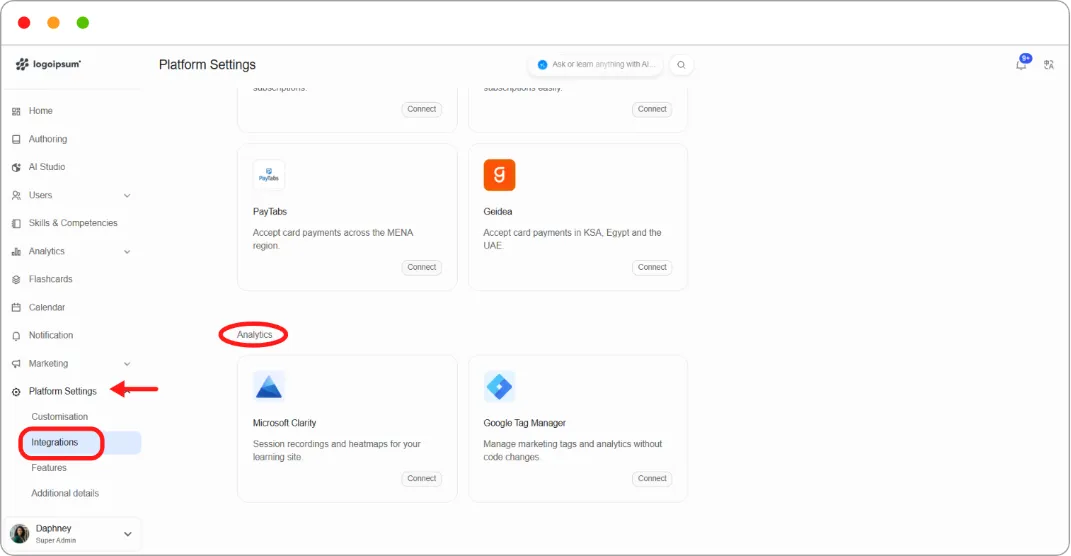
Step 2: Under Analytics, on the Microsoft Clarity card, click Connect.
Step 3: Paste your Clarity Project ID.
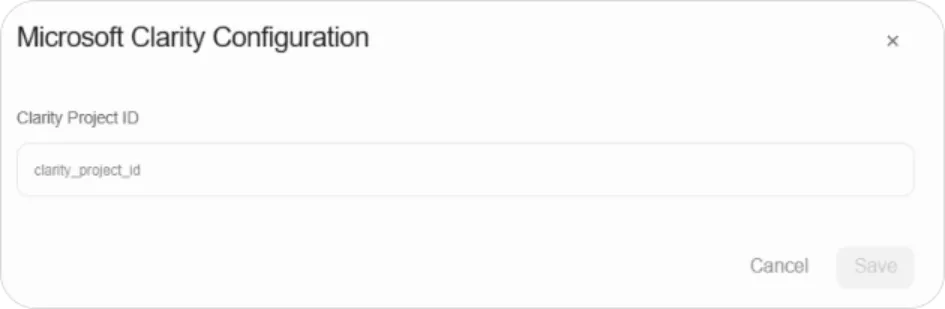
Step 4: Click Save.
Recordings appear in your Microsoft Clarity dashboard once learners start visiting your site.
Tip: Session recordings show what learners actually do, which is often different from what completion figures suggest. Useful when a course has high enrolment and low completion and you can’t work out why.
Note: Session recording captures learner behaviour. Check this against your privacy policy and your obligations in the regions where your learners are.