
Platform features reference
Who this is for: Super Admins, Admins, and Staff with the Platform Settings permission
Every feature toggle, grouped as it appears on Platform Settings > Features.
Content & delivery
Section titled “Content & delivery”| Feature | What it enables |
|---|---|
| Programs | Grouped courses with program-wide progress and enrolment |
| Live Sessions | Schedule and run live sessions in-platform |
| Learning paths | Ordered, gated learning paths with per-path progress, managed separately from programs |
| Flashcards | The Flashcards module in the admin console: browse, edit, and assign auto-generated flashcards and view review analytics |
Commerce
Section titled “Commerce”| Feature | What it enables |
|---|---|
| Payments | Accept payments for paid courses and programs |
| Subscriptions | Recurring subscriptions for courses and programs. Requires a payment gateway |
| Shopping Cart | Learners add courses to a cart before checkout. When off, learners buy or enrol directly |
| Coupon Management | Create and manage discount coupons |
Note: Subscriptions requires a payment gateway. Connect one before switching it on. See How to connect a payment gateway.
Branding & certificates
Section titled “Branding & certificates”| Feature | What it enables |
|---|---|
| Custom Certificates | The custom certificate authoring flow, which adds a Certificates tab under Customisation |
Communications
Section titled “Communications”| Feature | What it enables |
|---|---|
| Notification settings | Choose which notifications your organisation sends, and on which channels |
| Notification templates | Edit the wording of email notifications and learner risk alerts |
Developer tools
Section titled “Developer tools”| Feature | What it enables |
|---|---|
| Webhooks | Send platform events to external services |
| MCP keys | Connect your organisation to an MCP (Model Context Protocol) harness using scoped API keys |
Learner experience
Section titled “Learner experience”| Feature | What it enables |
|---|---|
| Learner Library | The Library page in the learner dashboard |
| Leaderboard | The leaderboard ranking learners by points in the learner dashboard. Click the gear icon on the card to set how points are earned |
| AI for learners | AI features for learners: the Ask AI bar, flashcards, and the in-course AI Mentor |
Configuring leaderboard points
Click the gear icon on the Leaderboard card to open Leaderboard points:
| Setting | What it controls |
|---|---|
| Points per block completion | Points awarded each time a learner completes a content block |
| Points per skill earned | Points awarded when a learner earns a skill |
| Streak points per day | Points awarded for each consecutive day of learning |
| Streak cap (days) | The maximum number of streak days that earn points |
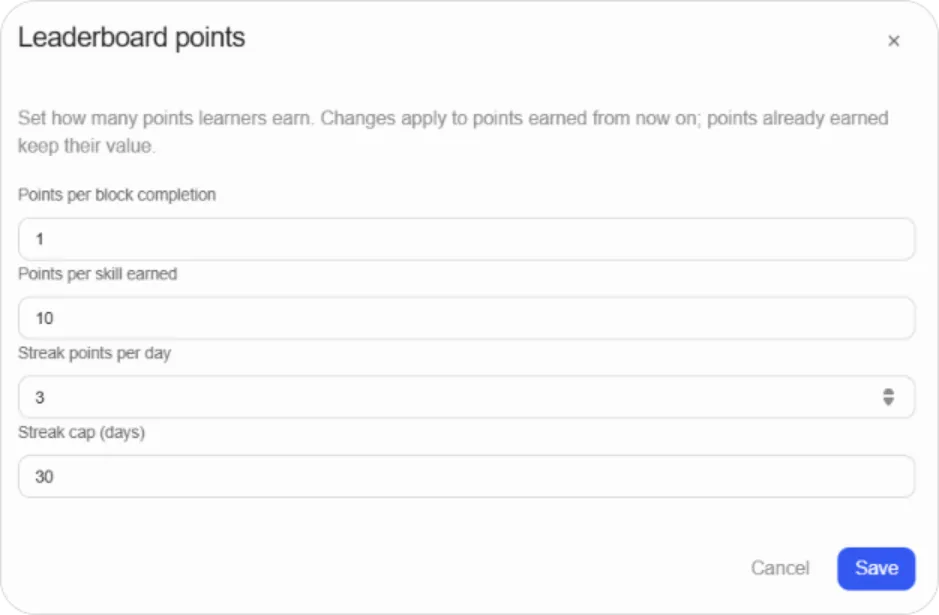
Note: Changes apply to points earned from now on. Points learners have already earned keep their original value, so adjusting the scheme doesn’t reshuffle your existing leaderboard.
Tip: Keep the ratio between block completion and skills wide. If finishing a block and earning a skill are worth similar points, the leaderboard rewards clicking through rather than learning.